 Telepult.Web
Studio tiles: background, masks and anonymity
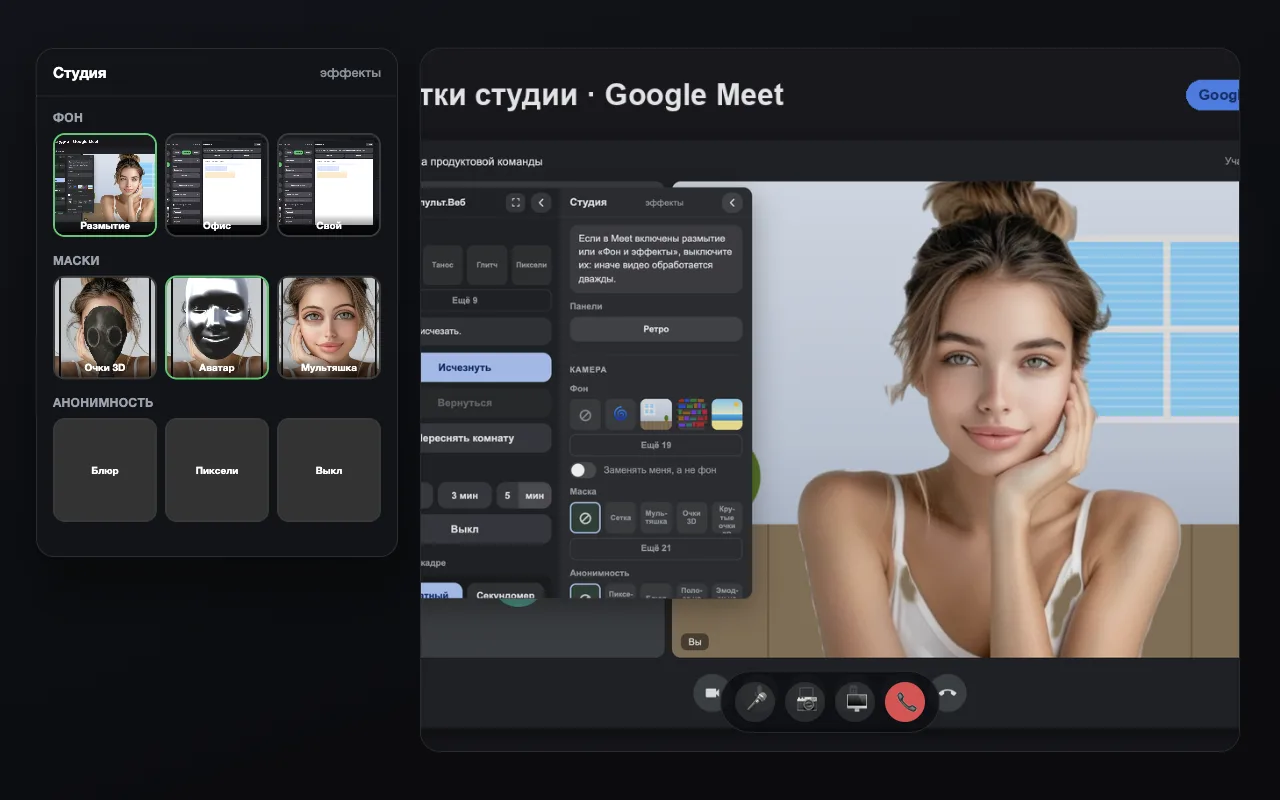
In 5.1 the Studio was made of lists. In 6.0 background, masks and anonymity are picked from tiles with a live preview — you see how the frame will look before applying it.
Step by step
- Install the extensionAdd Telepult.Web from the Chrome Web Store — in Chrome, Edge, Opera, Brave, Yandex Browser or another Chromium browser that supports Chrome extensions. It is free. Firefox has a separate build on addons.mozilla.org.
- Open a meetingOpen a meeting on any supported platform (Zoom, Meet, Teams, Telemost, MTS Link and others) and turn on your camera. The remote button appears — in the call toolbar or as a floating button.
- Open the StudioExpand the Studio block in the remote.
- Pick a tileA click on a preview turns on the background, the mask or the anonymity mode right away.
What is picked from tiles
- Backgrounds and blur
- 2D and 3D masks, avatars
- Anonymity: blur, pixels, eye bar, emoji
Your own background
You can still upload your own image separately — it appears among the Studio options.
Try it for free
Telepult.Web installs in a minute: Chrome, Edge, Opera, Brave, Yandex Browser and other Chromium browsers — from the Chrome Web Store. There is a Firefox version too.
Install from the Chrome Web StoreFAQ
Can I go back to lists?
There is no need: tiles replace the lists and show the result immediately.
Does it work on every platform?
Yes, the Studio interface is the same across the supported web calls.