 Telepult.Web
Light and beauty on a video call
Version 6.0 added a Light and beauty block to the remote: tune the picture like in a phone camera — brighter, warmer, smoother skin — without a separate app and without sending your video anywhere.
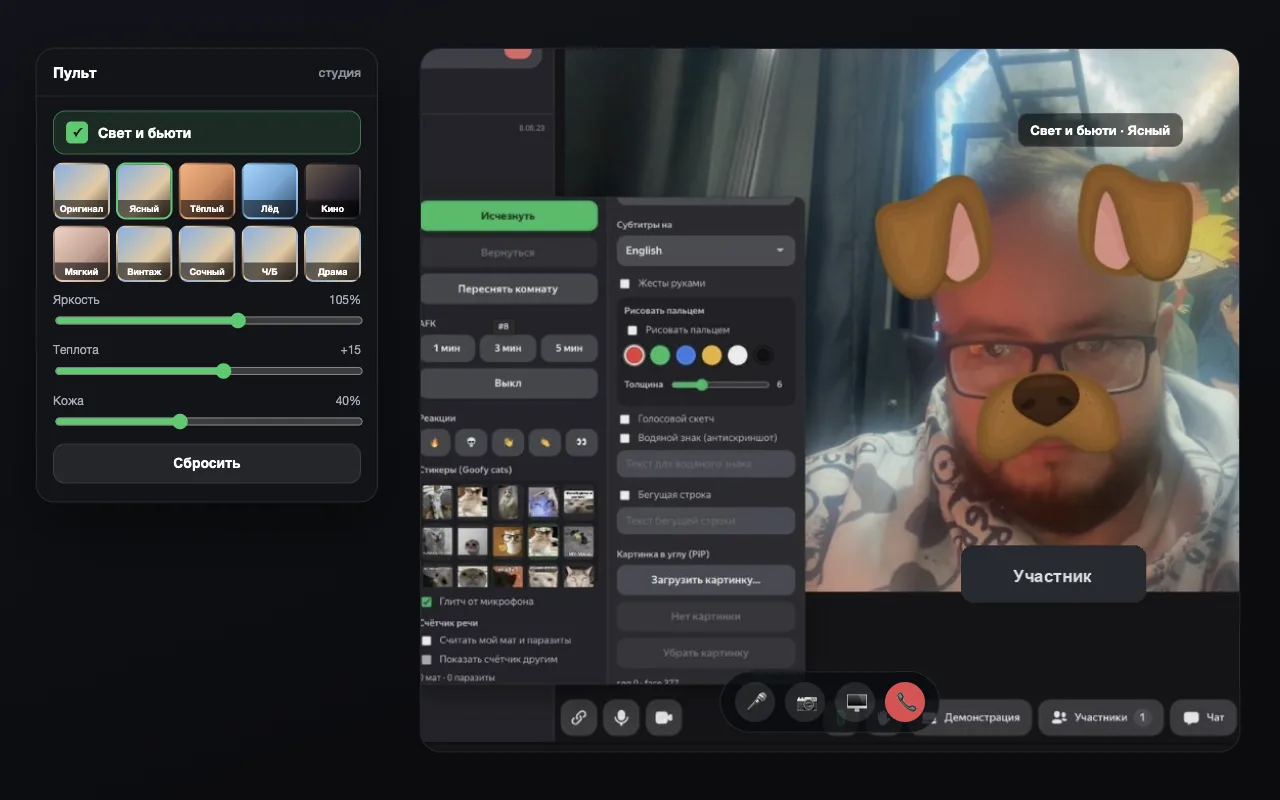
Step by step
- Install the extensionAdd Telepult.Web from the Chrome Web Store — in Chrome, Edge, Opera, Brave, Yandex Browser or another Chromium browser that supports Chrome extensions. It is free. Firefox has a separate build on addons.mozilla.org.
- Open a meetingOpen a meeting on any supported platform (Zoom, Meet, Teams, Telemost, MTS Link and others) and turn on your camera. The remote button appears — in the call toolbar or as a floating button.
- Turn on Light and beautyTick Light and beauty in the remote — presets and sliders appear.
- Pick a preset or move the slidersPresets: Clear, Warm, Ice, Cinema, Soft and others. Skin smooths your face separately.
What you can adjust
- Brightness, contrast, color saturation
- Warmth, haze, vignette
- Skin smoothing on the face
- Presets with a live preview from your camera
Where does the video go?
Nowhere. Processing happens locally in the browser, like every other effect of the remote.
Try it for free
Telepult.Web installs in a minute: Chrome, Edge, Opera, Brave, Yandex Browser and other Chromium browsers — from the Chrome Web Store. There is a Firefox version too.
Install from the Chrome Web StoreFAQ
Will the others see the beauty effect?
Yes — the effect is part of your video stream.
Do presets need a camera?
Yes. Preset previews are drawn from your current frame.